Description
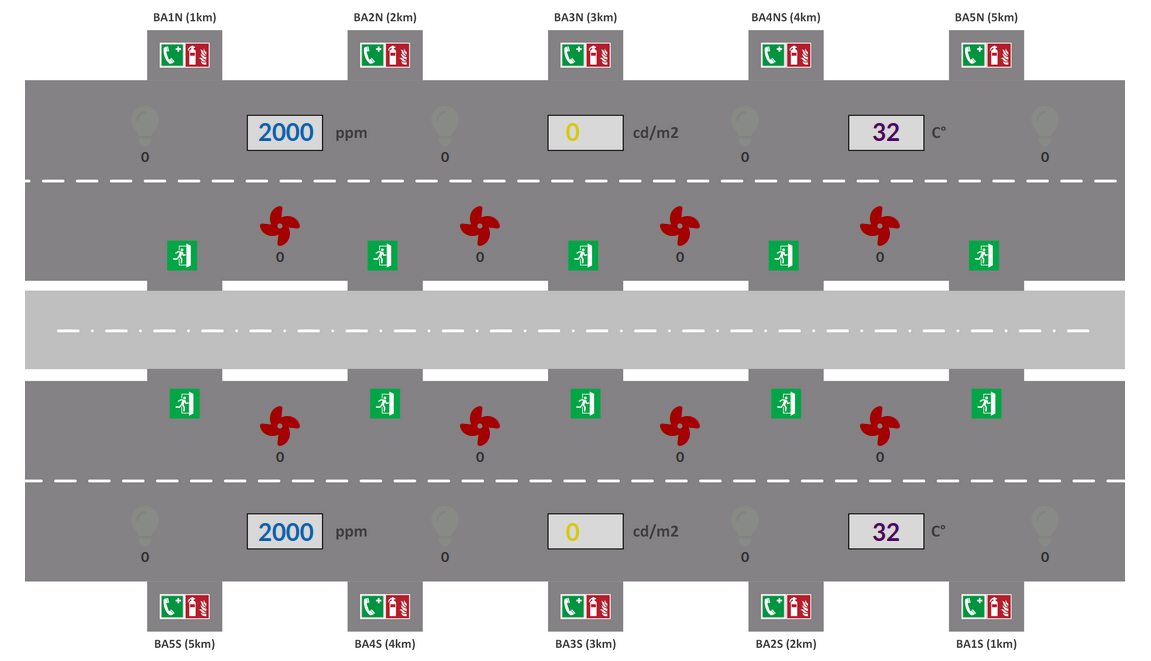
The 5-kilometre-long Grenelle Tunnel is due to be officially opened today, and local officials have travelled to the site to attend its inaugural opening. The tunnel’s control system is managed by a programmable logic controller (PLC) that communicates with the SCADA system via an industrial protocol on TCP/4502. This system regulates process parameters to ensure a safe journey through the tunnel for users. The process parameters regulated by this PLC are as follows:
- CO₂ levels (ppm)
- Illuminance (cd/m²)
- Temperature (°C)
For the tunnel to be commissioned, it must comply with current safety standards, namely a CO2 level of 800 ppm or less, a luminance of 300 cd/m2 or more, and a temperature of 25°C or less, in both the NORTH and SOUTH sections of the tunnel.
Although everything had appeared normal during the previous day’s checks, the tunnel operations teams were astonished to discover, on the very morning of the opening, that the fans and spotlights were switched off and that the Enedis substation at Grenelle supplying the tunnel was out of service. They immediately set about starting up the emergency generator and then restarting the tunnel control system via the SCADA interface. However, when they tried to log in to the interface using the account with the privileges to send commands, they realised that the account had been deleted overnight and that they now only had access to the read-only account.
With no other options, the tunnel operators are calling on your expertise to get the tunnel back up and running before the VIPs arrive. As you arrive late, you have just one minute to resolve the situation. There’s not a minute to spare…
These servers can be accessed at the following addresses:
- PLC:
nc tunnel-routier.fcsc.fr 4502 - SCADA web interface: http://localhost:8000/.
Important. Every new TCP connection to the controller triggers a reset of the controller; consequently, a new token is generated with every new connection. To complete the two stages of this challenge within the time limit, you must therefore not close your TCP connection and must make all your requests using the same TCP connection.
In this first part of the test, you must find a token hidden in the identification data of the machine which will allow you to access the second part of the test.
Note: The system’s description is available in README.md
Files
Author

Challenge Instructions
- First, download docker-compose.yml:
curl https://hackropole.fr/challenges/fcsc2026-misc-tunnel-routier/docker-compose.public.yml -o docker-compose.yml - Launch the challenge by executing in the same folder:
docker compose up - Then, in another console, access the challenge with Netcat:
nc localhost 4502 - Access the challenge at http://localhost:8000/.
In case you encounter problems, please consult the FAQ.
Flag
Submit your solution
You can submit your writeup for this challenge. Read the FAQ to learn how to proceed.
You need to be logged in to submit a writeup.